


AI & Data Fundamentals
What Is Enterprise Search? A Complete Guide
What Is Enterprise Search?
Enterprise search is the practice of finding information across an organization's many disconnected systems, CRMs, file storage, wikis, ticketing tools, email, code repositories, through a single point of entry. Instead of a person having to remember which application holds the answer and searching each one individually, an enterprise search system connects to those sources, organizes what it finds, and surfaces relevant results from one search bar or query interface.
It's easiest to think of it as the difference between asking one well-informed colleague a question versus tracking down five different coworkers and hoping one of them remembers where a document lives. As the number of tools a typical organization runs keeps growing, that second scenario becomes the default experience unless something is actively working to prevent it.
Why Enterprise Search Matters
Knowledge workers routinely lose meaningful chunks of their day to searching for information rather than acting on it, hunting through email threads, chat history, and shared drives for a document or answer that may or may not still be findable. That time doesn't just disappear quietly, it shows up as slower decisions, duplicated work, and colleagues interrupting each other to ask questions that a good search system should be able to answer directly.
Enterprise search also matters more than it used to because the number of applications an average employee touches keeps climbing. Every new tool an organization adopts is another place valuable information can end up siloed, and without a way to search across all of them at once, that growth quietly erodes productivity rather than improving it.
How Enterprise Search Works
Most enterprise search systems are built around a similar sequence, even though the underlying technology varies:
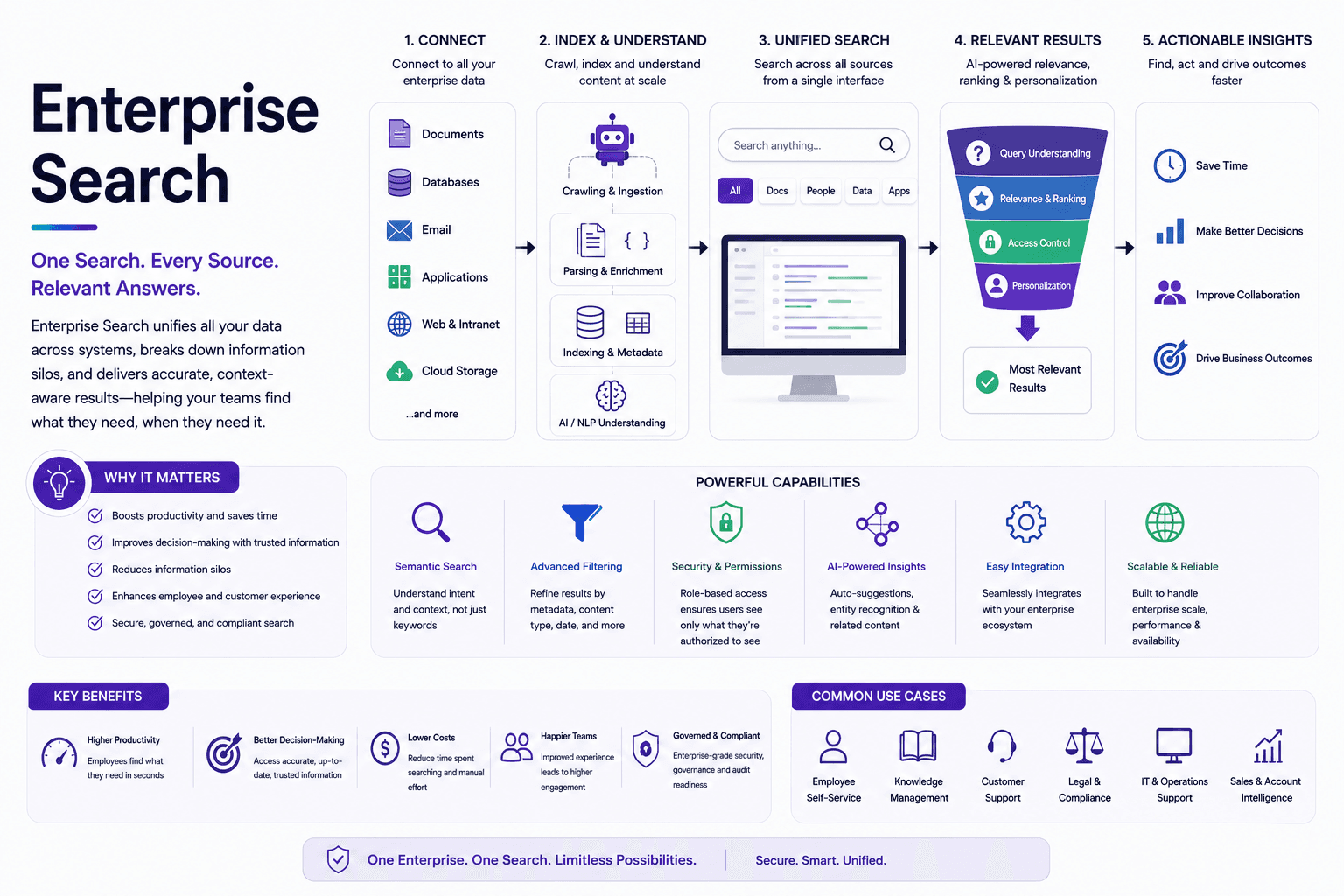
- Connecting to sources. The system integrates with the applications an organization uses, often through purpose-built connectors, so it can access content in each one without requiring a person to log into every tool separately.
- Collecting and processing content. Content is pulled from those sources and analyzed, extracting text, metadata, and structure so the system understands what it's looking at, whether that's a spreadsheet, a support ticket, or a meeting transcript.
- Indexing. Processed content is organized into a searchable index, the structure that allows the system to retrieve relevant results quickly rather than scanning every source from scratch on every query.
- Query processing. When someone searches, the system interprets what they're actually asking for. More advanced systems use natural language processing to understand a conversational question rather than requiring exact keyword matches.
- Ranking and permissions. Results are ranked by relevance, recency, and other signals, and filtered so each person only sees content they're actually authorized to access.
Types of Enterprise Search
- Siloed search — each data source has its own separate search, and users need to know which tool to check for which kind of information. Simple to set up, but it puts the burden of navigating multiple systems back on the user.
- Federated search — a single query is sent out to multiple systems at once, and the results come back organized by source. This avoids building a central index but can be slower, since every search touches every connected system in real time.
- Unified search — content from many sources is combined into one shared index, and a single query returns one consolidated set of results rather than results grouped by source.
- AI-powered search — machine learning is applied on top of a unified index to understand intent, interpret natural language, and rank results based on relevance signals beyond simple keyword matching.
Key Components of an Enterprise Search System
- Connectors. The components that let the system pull data from a given source, whether through a crawler that regularly scans a system or a push-based integration that sends updates as they happen.
- Access controls and permissions. Enterprise search has to respect the same permission structures that already govern each source system, so a search result never exposes content a user isn't supposed to see.
- Relevance ranking. Factors like keyword frequency, recency, user role, and past behavior all feed into how results are ordered, since a technically matching result that's buried on page three isn't very useful.
- Analytics. Tracking what people search for, what they click on, and where searches fail helps teams identify gaps in coverage or relevance over time.
How AI Is Transforming Enterprise Search
Traditional enterprise search largely depended on users knowing the right keywords and being willing to sift through a list of possible matches. AI has changed that experience in a few concrete ways:
- Natural language understanding. Instead of guessing which exact words might appear in a document, users can ask a plain, conversational question and get a relevant answer.
- Intent recognition. AI-powered systems can often tell the difference between someone researching a broad topic and someone trying to locate one specific file, even when the search terms look similar.
- Personalization. Search results can be shaped by a person's role, recent activity, and history, so two different employees searching the same term may see different, more relevant results.
- Synthesis. Rather than returning a list of documents to sort through, AI-powered search can pull relevant pieces from multiple sources and summarize them into a direct answer.
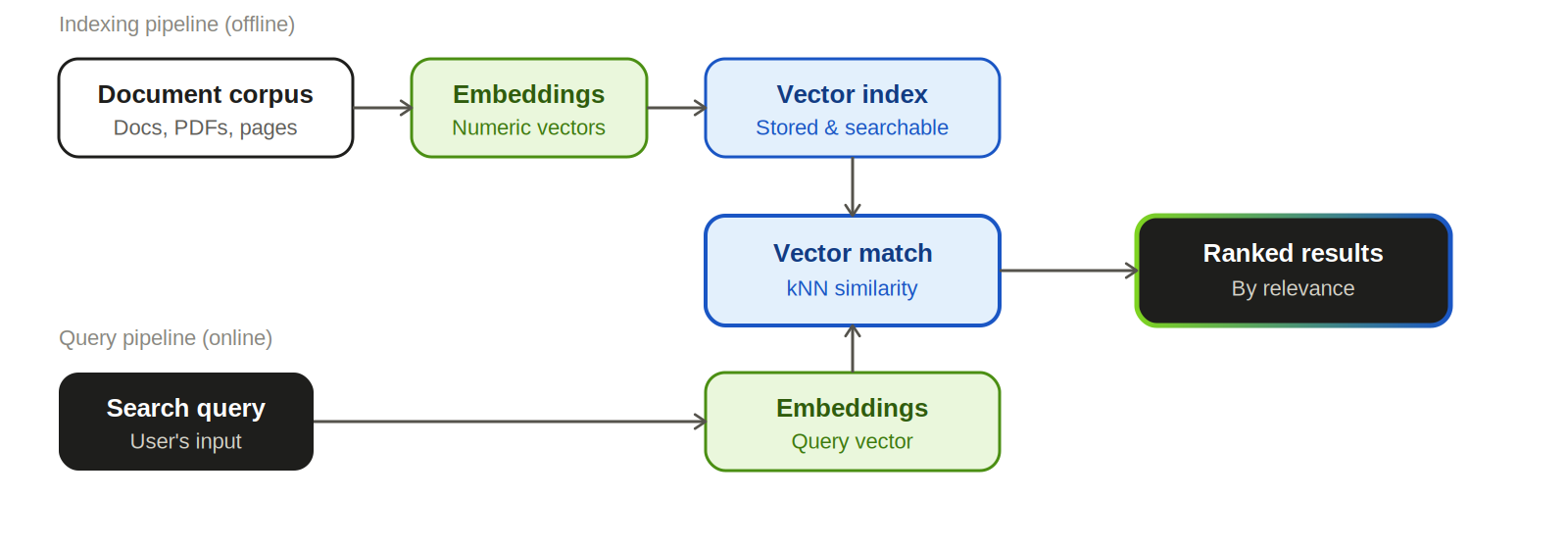
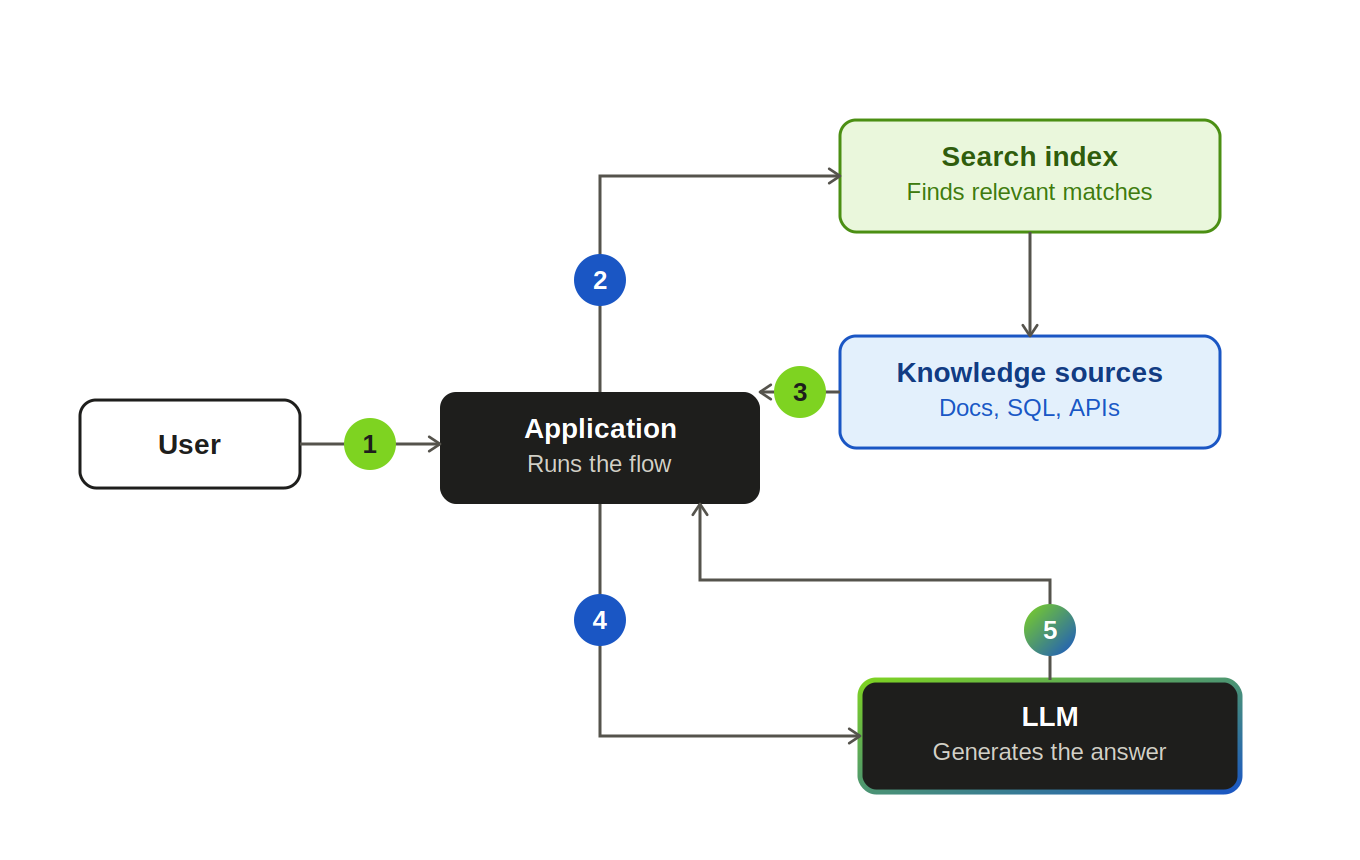
This is also where enterprise search connects closely to retrieval-augmented generation and vector databases: many modern search systems now go beyond keyword and synonym matching to retrieve content based on meaning, which is exactly the capability that lets an AI assistant answer a question by drawing on real, current organizational knowledge instead of guessing.
Benefits of Enterprise Search
- Higher productivity. Employees spend less time hunting for information and more time acting on it.
- Better decisions. Faster access to accurate, current information means decisions don't stall while someone waits to track down a document or a colleague.
- Reduced duplicated work. When existing knowledge is easy to find, teams are less likely to recreate something that already exists elsewhere in the organization.
- Improved customer experience. Customer-facing enterprise search, on a website or in a support portal, helps people or agents find answers quickly, which can directly affect satisfaction and conversion.
Common Use Cases
- Internal knowledge access — helping employees find policies, past decisions, or project status without pinging a colleague.
- Customer self-service — letting customers search a knowledge base or FAQ to resolve issues without contacting support.
- Agent assist — giving support agents fast access to relevant tickets, documentation, and customer history while they're on a call or chat.
- E-commerce and product discovery — helping shoppers find relevant products through search, even when their query doesn't exactly match product names.
- Website and portal search — improving navigation and engagement for visitors trying to find specific content on a public or partner-facing site.
Best Practices for Implementing Enterprise Search
Start with your highest-value use cases.
Identify the searches that happen most often or matter most to the business, and prioritize connecting and indexing those sources first rather than trying to cover everything at once.
Audit your information sources before you build.
Map out where knowledge actually lives across the organization so you can prioritize integrations by real usage and importance, not assumptions.
Set clear success metrics.
Track measures like search success rate, click-through on results, and how often searches come up empty, so you can tell whether the system is actually working.
Treat permissions as a first-class requirement, not an afterthought.
A search result that surfaces content a user shouldn't see is a security incident, not a minor bug, so access controls need to be built in from the start.
Keep improving relevance over time.
Regularly review search logs and failed queries to catch gaps in coverage, and adjust ranking based on real user behavior rather than a one-time setup.
Expand connectors as the business evolves.
New tools and data sources will keep appearing; plan for ongoing integration work rather than treating the initial rollout as the finish line.
Frequently Asked Questions
Web search indexes public content across the internet and is available to anyone. Enterprise search focuses on an organization's private data, has to respect internal permission structures, and can be tailored to specific roles and workflows in ways general web search isn't designed to support.
Site search is scoped to a single website or application, typically for external visitors browsing public content. Enterprise search spans multiple internal systems and serves employees trying to access private organizational knowledge, though it can also power customer-facing site search as one of its use cases.
Not necessarily, but many modern enterprise search systems use one to enable meaning-based retrieval rather than relying solely on keyword matching. It becomes especially valuable when the goal is to answer natural language questions rather than return a list of documents containing specific terms.
Siloed search requires users to search each system separately. Federated search sends one query to multiple systems and returns results grouped by source. Unified search combines content from multiple sources into a single index and returns one consolidated result set.
Common indicators include search success rate, click-through rate on results, how often searches return no useful match, and how search behavior changes over time as users grow more comfortable relying on it as a first resource.
Turn this insight into your next move.
Tell us what you're building and we'll show you where uCube.ai actually fits — no generic demo, just a straight conversation about your data and your goals.